Close Menu
    Facebook X (Twitter) Instagram
    Oixiesoft
    • Home
    • Services
      • WordPress Malware Removal Services
      • Fix WordPress Errors
      • WordPress Website Development
    • Articles
    • Contact
    Oixiesoft
    Home»Tutorial»html»HTML Tags
    html

    HTML Tags

    Editorial StaffBy Editorial StaffUpdated:April 21, 2022No Comments2 Mins Read
    Share
    Facebook Twitter LinkedIn Pinterest Email

    What Are HTML Tags?

    The entire HTML code fine based on HTML Tags. HTML Tags are predefined elements in HTML. They are used to markup the start of an HTML element and enclosed within these brackets < > symbols. 

    <code> Content here…</code>

    Here are the examples of some HTML tags:

    <h1>Welcome to Oixiesoft</h1>

    <p>A tutorial website.</p>

    Most of the html tags must be opened <body> and closed </body>.

    Types of tags in HTML

    There are two types of tags in HTML that are used to create web pages:

    1. Paired Tags (Opening and Closing Tags)
    2. Unpaired Tags (Singular Tag)

    Paired Tags

    Here are the given below some paired tags in HTML:

    Open Tag Close Tag
    <html> </html>
    <body> </body>
    <form> </form>
    <h1> </h1>
    <ul> </ul>
    <p> </p>
    <head> </head>
    <div> </div>

    HTML – <html> tag describes what computer language the page is written in. All the contents of a page should be placed between the Html (at the top of the page) and /or Html (at the bottom of the page) tags.

    head – the meta tags appear between the head and /head tags.

    body – all the page content appears between the body (at the top of the page) and /or body (at the bottom of the page) tags.

    table – starts a table. You can make the width any that you like by adding a width=”” attribute. You can do it in percentages, width=”100%” or pixels, width=”710″ . The Golden Rule – every open table must be a closed /table.

    tr – <tr>tag sets up the rows in a table, and /tr closes the rows.

    td -<td>tag sets up the columns in a table, and /td closes the rows.
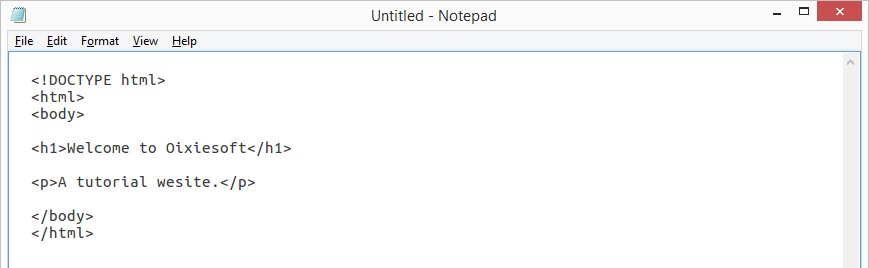
    HTML Editors

    Unpaired Tags (Singular Tag)

    Open Tag
    <br>
    <hr>
    <meta>
    <input>
      <!DOCTYPE html> 
        <html> 
        <body>
    <hr>
        <h1>Welcome to Oixiesoft</h1> 
        <p>A tutorial website.</p>
    <hr>
        </body> 
        </html>
    

    Output
    HTML Tags


    Share. Facebook Twitter Pinterest LinkedIn WhatsApp Reddit Tumblr Email
    Editorial Staff

    Related Posts

    CodeIgniter vs Laravel: A Detailed Side-by-Side Comparison

    Python Arrays

    Python Lambda

    • HTML Introduction
    • HTML Editors
    • HTML Tags
    • HTML Attributes
    • HTML Headings
    • HTML Paragraphs
    • HTML Comments
    • HTML Styles
    • HTML Text Formatting
    • HTML Colors
    • HTML links
    • HTML Images
    • HTML Styles – CSS
    • HTML Tables
    • HTML Lists
    • HTML Forms
    Services
    • Web Development
    • Mobile Application Development
    • WordPress Malware Removal Service
    • Website Design
    • WordPress Development
    • Magento Development
    • Shopify Development
    • SEO Services
    Blog
    • How to Fix the Error Establishing a Database Connection
    • Ping List WordPress
    • How To Fix Japanese Keyword Hack
    • How to remove Malware from WordPress
    Hire Developers
    • Hire WordPress Developer
    • Hire Shopify Developer
    Contact Info
    • Oixiesoft Technologies
      A-40, Block A, I thum Tower, Sector 62, Noida
    • sales@oixiesoft.com
    • Privacy Policy
    • About Us
    • Contact Us
    © 2026 OixieSoft Technologies

    Type above and press Enter to search. Press Esc to cancel.